
Updates for one year, unlimited sites, unlimited downloads, and regular updates.
$4.99
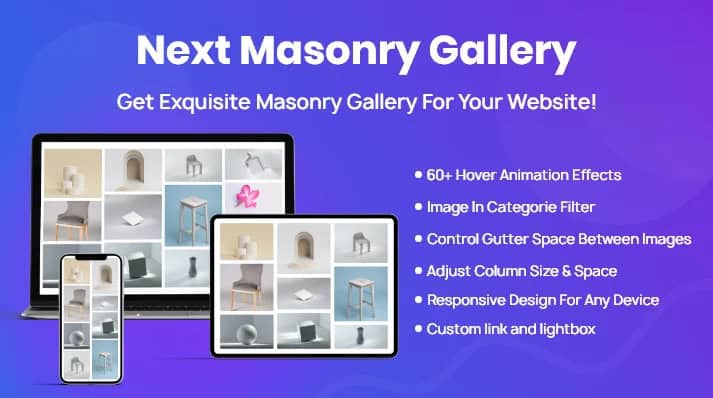
The Divi Next Masonry Gallery plugin emerges as a powerful solution for WordPress users leveraging the Divi theme, seeking to transform their website’s visual presentation. Designed to seamlessly integrate with Divi, this plugin empowers users to effortlessly construct stunning masonry galleries, presenting content in a modern, organized, and highly engaging format. It offers extensive customization capabilities, allowing galleries to perfectly align with a brand’s unique aesthetic, ultimately boosting user interaction and effectively showcasing a diverse range of work or content.
In the dynamic world of web design, visual content plays an indispensable role in capturing audience attention and conveying messages effectively. For websites built with the versatile Divi theme, the need for sophisticated and aesthetically pleasing ways to display images and other media is paramount. The Divi Next Masonry Gallery plugin addresses this need directly, providing a specialized tool for creating one of the most popular and visually appealing gallery layouts available today: the masonry grid.
What is a Masonry Gallery?
A masonry gallery is a type of grid layout where items of varying heights are arranged in columns, fitting together like bricks in a wall, without any gaps between them. Unlike traditional grid layouts that force all items into uniform rows and columns, often resulting in awkward cropping or excessive white space, the masonry layout optimizes space by allowing items to maintain their original aspect ratios while still aligning neatly. This creates a visually dynamic and organic flow, making the gallery feel more natural and engaging.
Why Masonry Layouts are Popular
The popularity of masonry layouts stems from several key advantages. Firstly, they are inherently visually appealing, offering a modern and sophisticated look that stands out from conventional grids. Secondly, they are highly efficient in terms of space utilization, allowing more content to be displayed in a compact area without sacrificing readability or aesthetic quality. Thirdly, masonry layouts are excellent for showcasing content with diverse dimensions, such as a mix of portrait, landscape, and square images, ensuring each piece is presented optimally. This dynamic arrangement naturally draws the eye, encouraging visitors to explore the entire gallery.
The Role of Divi Next Masonry Gallery
The Divi Next Masonry Gallery plugin specifically brings this powerful layout capability to the Divi ecosystem. It’s not just about creating a masonry grid; it’s about doing so with the ease, flexibility, and native integration that Divi users expect. By providing a dedicated module or set of tools within the Divi Builder, the plugin simplifies the process of transforming a collection of images or content into a captivating visual experience. Its core purpose is to elevate the visual appeal of any Divi-powered website, making it easier for creators to present their work, products, or stories in a compelling and organized manner.
The strength of Divi Next Masonry Gallery lies in its comprehensive suite of features, all designed to facilitate the creation of high-quality, customizable, and engaging masonry galleries within the Divi framework. These features collectively contribute to a seamless user experience for both the website administrator and the end-user.
Seamless Divi Integration
One of the most critical aspects of this plugin is its deep and seamless integration with the Divi theme. This means that users can expect to manage their galleries directly within the familiar Divi Builder interface, utilizing its drag-and-drop functionality and intuitive controls. The plugin likely operates as a custom Divi module, allowing it to inherit Divi’s styling options, global settings, and responsive design capabilities. This native integration ensures a consistent workflow and minimizes any learning curve for existing Divi users, making gallery creation feel like an extension of the Divi experience rather than an external add-on.
Effortless Gallery Creation
The plugin is designed for ease of use, enabling users to “effortlessly create stunning masonry galleries.” This implies a streamlined process for selecting images or content, arranging them, and applying the masonry layout. Users can typically pull media from the WordPress media library, categorize them, and then have the plugin automatically arrange them into the optimized grid. The emphasis on “effortless” suggests that complex coding or manual adjustments are largely eliminated, allowing creators to focus on their content rather than technical implementation.
Stunning Visual Presentation
Beyond mere functionality, the plugin aims to deliver “stunning” visual results. This involves not only the inherent beauty of the masonry layout but also potentially includes features like high-quality image rendering, smooth transitions, and elegant hover effects. The goal is to make each gallery a captivating focal point on the page, drawing visitors in and encouraging them to spend more time interacting with the displayed content. The visual impact is a primary driver for boosting user engagement.
Modern and Organized Layouts
The plugin’s ability to create “modern and organized layouts” is central to its value proposition. A modern layout implies adherence to contemporary web design trends, offering a clean, uncluttered, and sophisticated aesthetic. An organized layout, particularly with masonry, means that despite varying item sizes, the overall presentation remains coherent and easy to navigate. This organization helps users quickly scan and absorb the content, preventing visual fatigue and enhancing the overall user experience.
Extensive Customization Options
To truly “match your brand‚Äôs aesthetic,” the plugin must offer a robust set of customization options. This is where the versatility of Divi Next Masonry Gallery shines, allowing users to fine-tune nearly every aspect of their galleries.
Responsive Design
While not explicitly stated as a separate feature, “modern” layouts and “seamless integration with the Divi theme” strongly imply full responsiveness. A truly effective masonry gallery must adapt flawlessly to various screen sizes, from large desktop monitors to tablets and smartphones. The plugin would automatically adjust column counts, image sizes, and spacing to ensure the gallery remains visually appealing and fully functional on any device, providing an optimal viewing experience for all visitors.
Performance Optimization
For any image-heavy component like a gallery, performance is crucial. A well-designed plugin would incorporate optimization techniques such as lazy loading, which defers the loading of images until they are visible in the user’s viewport. This significantly improves page load times, especially for galleries with many items. Other optimizations might include efficient image compression and proper caching mechanisms, ensuring that the “stunning” visuals don’t come at the cost of slow website performance.
User Engagement Features
The summary explicitly states the plugin helps “boost user engagement.” This suggests the inclusion of interactive features that go beyond static image display.
Implementing Divi Next Masonry Gallery offers a multitude of advantages for anyone looking to enhance their Divi-powered website, from individual bloggers to professional agencies.
Enhanced Visual Appeal
The most immediate benefit is the dramatic improvement in a website’s visual aesthetics. Masonry layouts inherently possess a modern, artistic quality that can elevate the perceived professionalism and creativity of a site. By presenting images and content in an organized yet dynamic fashion, the plugin helps create a more engaging and memorable browsing experience, making the website stand out from competitors.
Improved User Experience
A well-designed gallery contributes significantly to a positive user experience. The organized nature of masonry layouts makes it easier for visitors to consume visual content without feeling overwhelmed. Interactive features like lightboxes and filtering further empower users, giving them control over how they view and explore the content. This leads to longer visit durations, lower bounce rates, and a more satisfying interaction with the website.
Time and Effort Savings
The “effortless” creation aspect translates directly into significant time and effort savings for website administrators and designers. Instead of manually arranging images or wrestling with complex CSS to achieve a masonry effect, the plugin automates much of the process. This allows creators to allocate more time to content creation, marketing, or other critical aspects of their business, rather than getting bogged down in technical implementation.
Brand Consistency
With extensive customization options, the plugin ensures that galleries can be perfectly tailored to match a brand’s specific aesthetic, including colors, fonts, and overall design language. This consistency across all visual elements of a website reinforces brand identity, making the site feel cohesive, professional, and trustworthy. It’s crucial for businesses and portfolios where brand image is paramount.
Showcasing Portfolio and Products
For creatives, photographers, artists, and e-commerce businesses, the ability to “showcase your work” effectively is non-negotiable. Divi Next Masonry Gallery provides an ideal platform for presenting portfolios, product catalogs, or project galleries in a visually compelling manner. The dynamic layout highlights individual pieces while maintaining an organized overview, making it easier for potential clients or customers to appreciate the quality and breadth of the work on display.
SEO Considerations
While not a direct SEO plugin, the features of Divi Next Masonry Gallery can indirectly contribute to better search engine optimization. Improved page load times (due to potential performance optimizations like lazy loading) are a known ranking factor. Enhanced user engagement (longer time on site, lower bounce rate) signals to search engines that the content is valuable, which can positively impact rankings. Furthermore, the ability to add descriptive captions and alt text to gallery images, often supported by such plugins, is crucial for image SEO, helping search engines understand the content of the images.
The versatility of Divi Next Masonry Gallery makes it suitable for a wide array of applications across various industries and website types.
Photography Portfolios
Photographers can leverage the plugin to create stunning online portfolios that beautifully display their work. The masonry layout is particularly effective for showcasing a mix of portrait, landscape, and square photographs without awkward cropping, allowing each image to shine while maintaining a cohesive gallery.
Art and Design Showcases
Artists, graphic designers, illustrators, and web designers can use the plugin to present their creative projects. Whether it’s a collection of paintings, digital art, UI/UX designs, or branding projects, the masonry gallery provides an elegant and professional way to exhibit their talent.
E-commerce Product Displays
Online stores can utilize the plugin to create attractive product galleries, especially for items that benefit from multiple visual angles or lifestyle shots. A masonry layout can make a product page more dynamic and engaging, encouraging customers to explore different product variations or related items.
Blog Post Archives
Bloggers and content creators can transform their blog archives or category pages into visually rich masonry grids. Instead of a standard list, displaying featured images from blog posts in a masonry layout can make the archive page more appealing and encourage readers to click through to articles.
Event Galleries
For event organizers, wedding planners, or anyone documenting events, the plugin offers an excellent way to share event photos. A masonry gallery can capture the energy and diversity of an event, presenting a large number of images in an easily digestible and attractive format.
Testimonial Walls
Businesses can create a “wall of fame” for client testimonials, featuring client photos alongside their quotes. A masonry layout can make this section visually interesting and credible, showcasing social proof in an engaging manner.
The process of integrating and utilizing Divi Next Masonry Gallery is designed to be straightforward, especially for those already familiar with the Divi ecosystem.
Installation and Activation
Typically, the first step involves purchasing and downloading the plugin from its official source. Installation follows the standard WordPress procedure: uploading the plugin zip file via the WordPress dashboard (Plugins > Add New > Upload Plugin) or via FTP, and then activating it. Once activated, the plugin’s functionalities become available within the Divi Builder.
Creating Your First Gallery
After activation, users would navigate to a page or post where they wish to add a gallery and open it with the Divi Builder. Within the builder, they would add a new module and select the Divi Next Masonry Gallery module (or similarly named module). From there, the interface would guide them through selecting images from the WordPress media library, defining categories, and setting initial layout parameters.
Customizing Your Gallery
The true power of the plugin comes alive in the customization options. Within the Divi module settings, users can delve into various tabs for content, design, and advanced settings. This is where they would adjust column counts, gutter spacing, hover effects, lightbox options, captions, and overall styling to perfectly match their website’s design and brand identity. The real-time visual feedback of the Divi Builder makes this process intuitive and efficient, allowing for immediate preview of changes.
For Divi users, the choice of a gallery plugin often comes down to integration, features, and ease of use. Divi Next Masonry Gallery stands out for several compelling reasons.
Divi-Centric Design
Its primary advantage is its native and seamless integration with the Divi theme. This means users don’t have to contend with compatibility issues, conflicting styles, or a disjointed user interface. The plugin feels like an inherent part of Divi, leveraging its powerful builder and design philosophy to provide a cohesive experience.
Focus on Aesthetics and Performance
The plugin is built with a dual focus on delivering “stunning” visuals and ensuring optimal website performance. This balance is crucial for modern web design, where beautiful imagery must not come at the expense of speed and responsiveness. By prioritizing both, the plugin helps create galleries that are not only attractive but also contribute positively to the overall user experience and SEO.
Versatility and Power
Described as “