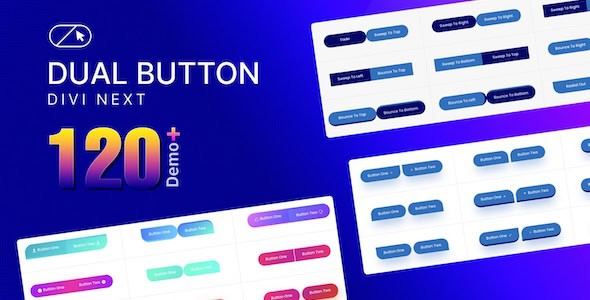
The Divi Next Dual Button plugin is a specialized WordPress extension designed to empower Divi users with the ability to create visually striking and highly functional dual buttons. This plugin aims to significantly enhance user engagement and improve the overall aesthetic and interactive quality of a website by providing a dedicated module for crafting side-by-side calls to action. It focuses on offering extensive customization options for button styles, colors, and hover effects, ensuring that these interactive elements seamlessly align with any brand’s design language and contribute effectively to conversion goals.
Understanding Divi Next Dual Button
At its core, Divi Next Dual Button introduces a unique element to the Divi Builder: the dual button module. Unlike standard single buttons, this module allows for the creation of two distinct, yet visually cohesive, buttons presented together. This arrangement is particularly effective for scenarios where users need to be presented with two primary choices or actions that are related but distinct. The plugin’s design philosophy centers on providing a powerful tool that is both easy to use and deeply integrated into the Divi ecosystem, allowing for rapid deployment of sophisticated interactive elements.
The concept of a dual button is to offer clear, immediate choices to a website visitor without overwhelming them. Instead of a single call to action, which might not cater to all user intentions, or multiple disparate buttons that could clutter the interface, a dual button presents two well-defined paths in a visually organized manner. This approach can guide users more effectively through a website’s content, services, or product offerings, leading to a more intuitive and engaging user journey.
Core Functionality and Design Philosophy
The plugin’s primary function is to provide a dedicated module within the Divi Builder that allows users to add and configure dual buttons. This module is engineered to be intuitive, enabling users to effortlessly drag and drop it onto any Divi-powered page or post. Once placed, the module exposes a comprehensive set of controls that govern every aspect of the dual button’s appearance and behavior.
The design philosophy behind Divi Next Dual Button emphasizes both aesthetic flexibility and functional clarity. It recognizes that effective calls to action are not just about what they say, but also how they look and feel. By offering granular control over design elements, the plugin ensures that dual buttons can be styled to be prominent without being intrusive, and informative without being verbose. This balance is crucial for maintaining a professional website appearance while simultaneously driving user interaction.
Comprehensive Customization Capabilities
One of the most significant strengths of Divi Next Dual Button lies in its extensive customization options. The plugin provides users with the tools to tailor every visual aspect of their dual buttons, ensuring they perfectly match the website’s branding and design aesthetic. This level of control is paramount for creating a cohesive and professional online presence.
- Button Styles: Users can define the overall look and feel of each button individually. This includes control over typography, allowing for selection of fonts, font weights, sizes, letter spacing, and line height. Furthermore, options for text color, background color, and border styles (width, color, radius) are available. The ability to add box shadows provides depth and visual prominence, while padding and margin controls ensure optimal spacing and alignment within the layout.
- Color Schemes: The plugin offers precise control over the color palette. Users can set distinct background colors for each button, choose text colors, and even apply gradient backgrounds for more dynamic visual effects. This extends to icon colors, ensuring that all elements within the dual button module are harmoniously colored. The flexibility in color selection allows for adherence to brand guidelines or experimentation with contrasting colors to highlight specific actions.
- Hover Effects: To enhance interactivity and provide visual feedback, Divi Next Dual Button includes a range of customizable hover effects. These effects can transform the appearance of a button when a user’s mouse cursor hovers over it. Options typically include changes in background color, text color, border color, shadow effects, and even subtle animations like scaling or shifting. Thoughtful application of hover effects can make buttons feel more responsive and engaging, guiding the user’s eye and indicating interactivity.
- Icon Integration: Beyond text, the plugin supports the integration of icons into each button. Icons can significantly improve the clarity and scannability of a call to action, especially when space is limited or when conveying a universal concept. Users can select from a wide library of icons, customize their size, color, and placement relative to the button text, further enhancing the visual appeal and functional clarity of the dual buttons.
- Advanced Styling Options: For users seeking even greater control, the plugin often includes advanced styling options such as custom CSS fields, allowing for unique visual treatments that go beyond the standard interface controls. This ensures that designers and developers have the flexibility to implement highly specific design requirements.
Seamless Divi Builder Integration
As its name suggests, Divi Next Dual Button is built specifically for the Divi ecosystem. This means it integrates seamlessly with the Divi Builder, providing a native and intuitive user experience for anyone familiar with Divi’s interface. This deep integration is a key factor in the plugin’s “effortless” creation promise.
- Native Divi Module: The plugin appears as a standard module within the Divi Builder’s module library. Users can simply search for “Dual Button” and drag it onto their page. This familiarity reduces the learning curve and allows for quick adoption.
- Intuitive Settings Panel: All customization options are presented within the familiar Divi module settings panel, organized into tabs like “Content,” “Design,” and “Advanced.” This structured approach makes it easy to navigate and adjust settings without needing to delve into code.
- Live Visual Feedback: A crucial aspect of Divi’s power is its visual builder, and Divi Next Dual Button leverages this fully. As users make changes to button styles, colors, or hover effects in the settings panel, they can see the updates reflected in real-time on the page. This live feedback loop accelerates the design process and allows for immediate iteration and refinement.
- Responsive Design Controls: In today’s multi-device world, responsiveness is non-negotiable. The plugin provides specific controls within the Divi Builder to adjust button appearance and behavior across different screen sizes (desktop, tablet, mobile). This ensures that dual buttons look and function perfectly on any device, contributing to a consistent and positive user experience.
- Divi Presets and Global Styles: The plugin is designed to work harmoniously with Divi’s global styles and preset system. Users can save their customized dual button designs as presets for future use, or apply global styles to maintain consistency across their entire website. This streamlines workflow and ensures brand uniformity.
Enhancing User Experience (UX)
The strategic implementation of dual buttons, facilitated by Divi Next Dual Button, can significantly enhance the overall user experience on a website. By providing clear, well-defined choices, the plugin helps users navigate content more intuitively and reduces cognitive load.
- Clarity and Choice: Dual buttons offer two distinct paths, making it easier for users to understand their options at a glance. For instance, on a product page, “Add to Cart” and “Learn More” provide clear choices for different user intentions. This clarity prevents confusion and guides users efficiently.
- Visual Hierarchy: Through careful customization of styles, colors, and sizes, designers can establish a clear visual hierarchy between the two buttons. One button might be more prominent (e.g., a primary action), while the other serves as a secondary option. This visual guidance helps users prioritize their actions without feeling overwhelmed.
- Accessibility Considerations: While not explicitly stated, a well-designed plugin for Divi would inherently support accessibility best practices. This includes ensuring sufficient color contrast, proper semantic HTML structure, and keyboard navigability for interactive elements. By allowing extensive customization, the plugin empowers users to create accessible buttons that cater to a wider audience.
- Mobile Responsiveness: The ability to control responsive behavior ensures that dual buttons adapt gracefully to various screen sizes. This means buttons remain clickable, legible, and aesthetically pleasing on smartphones and tablets, preventing frustrating user experiences often associated with non-responsive elements.
- Reduced Decision Fatigue: Presenting too many options can lead to decision fatigue. Dual buttons, by limiting the immediate choices to two, simplify the decision-making process for users, making their interaction with the website smoother and more enjoyable.
Driving Conversions and Engagement
Beyond aesthetics and user experience, the ultimate goal of many website elements is to drive specific actions, or conversions. Divi Next Dual Button is engineered to contribute directly to this objective by making calls to action more compelling and effective.
- Clear Calls to Action (CTAs): Dual buttons inherently provide two distinct calls to action. By crafting compelling button text and pairing it with appropriate styling, website owners can guide users towards desired outcomes, whether it’s making a purchase, signing up for a newsletter, downloading a resource, or contacting support.
- Guiding User Journeys: In many scenarios, users might be at different stages of their journey. A dual button can cater to both. For example, on a service page, “Get a Free Quote” might target ready-to-convert users, while “Explore Our Services” caters to those still researching. This allows the website to effectively serve diverse user needs simultaneously.
- Increased Engagement: Visually appealing and interactive buttons naturally draw more attention. The customizable hover effects and distinct styling options of Divi Next Dual Button can make buttons more inviting to click, thereby increasing user engagement with key interactive elements on the page.
- A/B Testing Potential: The ease of customization within Divi allows for quick creation of different dual button variations. This facilitates A/B testing, where different button texts, colors, or hover effects can be tested against each other to determine which combinations yield the highest conversion rates. This data-driven approach can continuously optimize website performance.
- Strategic Placement: The flexibility of the Divi Builder means dual buttons can be strategically placed in high-visibility areas, such as hero sections, product descriptions, or at the end of blog posts, maximizing their potential to capture user attention and prompt action.
Versatility and Practical Use Cases
The versatility of Divi Next Dual Button makes it suitable for a wide array of applications across various types of websites. Its ability to present two clear choices makes it invaluable in many common web design scenarios.
- Product Pages: On an e-commerce product page, a dual button could offer “Add to Cart” as the primary action and “View Product Details” or “Add to Wishlist” as a secondary option. This caters to both immediate buyers and those needing more information.
- Service Offerings: For service-based businesses, a dual button might present “Request a Quote” alongside “Learn More About Our Services,” guiding potential clients based on their readiness to engage.
- Download Sections: When offering digital resources, a dual button could feature “Download PDF” and “View Online,” providing users with their preferred method of accessing content.
- Contact Forms: Instead of just a single “Submit” button, a dual button could offer “Call Us Now” and “Send Us an Email,” giving visitors immediate contact options.
- Blog Posts: At the end of a blog post, dual buttons could prompt readers to “Read Next Article” or “Subscribe to Newsletter,” keeping them engaged with the site’s content.
- Portfolio Websites: Designers and artists might use dual buttons to link to “View Full Project” and “Contact for Collaboration,” showcasing their work while also inviting new opportunities.
- Event Registrations: For events, a dual button could offer “Register Now” and “View Event Schedule,” providing options for immediate action or further exploration.
Performance Considerations
While the plugin adds functionality, a well-engineered Divi extension is designed with performance in mind. It is expected that Divi Next Dual Button would be developed to be lightweight, loading only the necessary scripts and styles to avoid negatively impacting website speed. Efficient code and optimized asset loading contribute to a fast-loading website, which is crucial for both user experience and search engine optimization.
Conclusion
Divi Next Dual Button stands out as a valuable addition to any Divi user’s toolkit. By providing a dedicated, highly customizable module for creating dual buttons, it addresses a specific need for presenting clear, engaging, and conversion-focused calls to action. Its seamless integration with the Divi Builder, coupled with extensive styling options for colors, styles, and hover effects, empowers users to design interactive elements that are both aesthetically pleasing and functionally effective. Whether the goal is to enhance user experience, drive conversions, or simply elevate website design, this versatile plugin offers a robust solution for crafting compelling dual buttons that resonate with visitors and guide them through their digital journey.
Alternative plugins
No reliable alternatives known.</