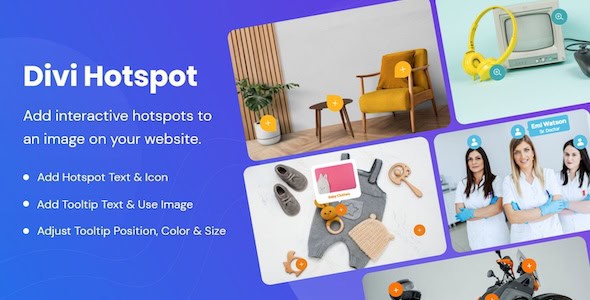
Divi Hotspot is a powerful WordPress plugin designed to transform static images on your website into dynamic, interactive experiences. By enabling the creation of clickable hotspots directly on images, it allows website owners to present detailed information, highlight specific features, and guide user attention in a highly engaging manner, all seamlessly integrated within the Divi Builder environment.
Unlocking Interactive Visuals with Divi Hotspot
In today’s visually-driven digital landscape, capturing and retaining user attention is paramount. Divi Hotspot addresses this need by providing an intuitive solution for adding layers of interactivity to your website’s imagery. Instead of relying on lengthy text descriptions or separate galleries, you can embed rich information directly into the visual context of an image. This capability elevates the user experience from passive viewing to active exploration, making your content more memorable and impactful.
The plugin’s core strength lies in its ability to integrate flawlessly with the Divi theme and its renowned Visual Builder. This means that users familiar with Divi’s drag-and-drop interface will find the process of creating and customizing hotspots incredibly straightforward. You can place an image on any Divi page or post, and then, with a few clicks, define interactive areas that reveal additional content upon user interaction, such as a hover or a click.
Core Functionality: Creating Engaging Hotspots
At its heart, Divi Hotspot is about making images talk. The process begins with selecting an image that serves as the canvas for your interactive elements. Once the image is in place, the plugin allows you to define specific regions or points on that image as “hotspots.” These hotspots are visual markers that signal to the user that there is more information to discover at that particular location.
When a user interacts with a hotspot, typically by clicking on it, a predefined action occurs. This action usually involves revealing a popup, a tooltip, or an overlay that contains additional content. This content can range from simple text descriptions to more complex elements like images, videos, links, or even short forms. The power of this approach is that information is delivered contextually, precisely when and where the user’s interest is piqued, leading to a more natural and less intrusive information-gathering process.
The plugin is engineered to be user-friendly, ensuring that even those without extensive technical knowledge can implement sophisticated interactive image features. The visual nature of the Divi Builder means you can see your changes in real-time, allowing for quick adjustments and refinements until the desired effect is achieved. This ease of use is crucial for maintaining an efficient workflow and empowering content creators to build dynamic pages without developer intervention.
Extensive Customization for Brand Consistency
One of the standout features of Divi Hotspot, as highlighted in its summary, is the extensive customization options available for hotspot styles, colors, and animations. This level of control is vital for ensuring that the interactive elements not only function effectively but also seamlessly blend with your website’s overall design and brand identity.
Customizing Hotspot Styles
The visual appearance of the hotspots themselves can be tailored to fit any aesthetic. You’re not limited to a single default look. Options typically include:
- Shape: Choose from various shapes like circles, squares, diamonds, or even custom icons that align with your brand’s visual language. This allows for creative expression and helps differentiate various types of information.
- Size: Adjust the size of the hotspot markers to ensure they are prominent enough to be noticed but not so large as to obscure important parts of the underlying image.
- Borders and Shadows: Add borders with customizable thickness and color, or apply subtle shadow effects to give hotspots a sense of depth and make them stand out from the image background.
- Icons: Integrate custom icons within the hotspot markers to visually communicate the type of information that will be revealed, such as a shopping cart icon for product details or an info icon for general information.
These styling options ensure that your interactive elements are not just functional but also contribute positively to the visual appeal and professionalism of your website.
Tailoring Hotspot Colors
Color plays a critical role in branding and user experience. Divi Hotspot provides granular control over the color schemes of your interactive elements:
- Marker Colors: Define the primary color of the hotspot marker, as well as its hover state color, to provide visual feedback to users.
- Popup/Tooltip Colors: Customize the background color, text color, and accent colors of the information popups or tooltips that appear when a hotspot is activated. This ensures that the revealed content is legible and consistent with your brand’s palette.
- Transparency: Adjust the transparency of hotspot markers or popups to allow parts of the underlying image to show through, creating a more integrated look.
By aligning the colors of your hotspots with your brand’s color scheme, you reinforce brand identity and create a cohesive user experience across your entire website.
Engaging Animations for Dynamic Interaction
Animations add a layer of dynamism and sophistication to user interactions. Divi Hotspot allows you to incorporate various animations to make the experience more engaging:
- Hover Effects: Apply subtle animations when a user hovers over a hotspot, such as a slight enlargement, a color change, or a pulsing effect, to draw attention and indicate interactivity.
- Click Effects: Implement animations that occur upon clicking a hotspot, providing immediate visual feedback that the action has been registered.
- Popup Entry/Exit Animations: Control how the information popups appear and disappear, using effects like fades, slides, or zooms. These animations can make the reveal of information feel smoother and more polished.
Thoughtful use of animations can significantly enhance user engagement, making the interaction feel more responsive and enjoyable, thereby contributing to a more positive overall impression of your website.
Diverse Use Cases and Applications
The versatility of Divi Hotspot makes it an invaluable tool across a wide range of industries and website types. Its ability to present information contextually opens up numerous creative possibilities for engaging users and achieving specific business objectives.
E-commerce and Product Showcases
For online stores, Divi Hotspot is a game-changer. Instead of a static product image with a separate list of features, you can:
- Highlight Product Details: Place hotspots on different parts of a product image to reveal specific details like material composition, dimensions, unique selling points, or manufacturing origin. For a piece of furniture, a hotspot on the leg could detail the wood type, while another on the upholstery could describe the fabric.
- “Shop the Look”: On lifestyle images featuring multiple products, add hotspots to each item, linking directly to its product page or revealing quick purchase options. This streamlines the shopping experience and encourages impulse buys.
- Feature Comparison: For complex products, use an image of the product with various features highlighted, each hotspot explaining its function and benefits.
- Interactive Catalogs: Transform digital catalogs into interactive experiences where users can click on items to learn more or add to cart.
This direct, visual approach to product information can significantly enhance the shopping experience, reduce friction, and ultimately drive higher conversion rates.
Real Estate and Property Listings
In the real estate sector, visual presentation is key. Divi Hotspot can be used to:
- Interactive Floor Plans: Overlay hotspots on a floor plan image to highlight specific rooms, amenities, or features, revealing details like room dimensions, flooring types, or smart home integrations.
- Property Feature Tours: On high-quality photographs of a property, place hotspots on key areas like the kitchen island, a unique architectural detail, or a garden feature, providing pop-up descriptions or even short video clips.
- Neighborhood Highlights: Use a map image of a neighborhood with hotspots indicating nearby schools, parks, public transport, or shopping centers, complete with relevant details and links.
This allows potential buyers or renters to explore properties in a more engaging and informative way, helping them visualize themselves in the space.
Education, Training, and Infographics
For educational platforms, training modules, or websites presenting complex data, Divi Hotspot can simplify information delivery:
- Interactive Diagrams: Transform static diagrams (e.g., human anatomy, machine schematics, process flows) into interactive learning tools. Hotspots can reveal definitions, functions, or related concepts.
- Explaining Complex Concepts: Use an image representing a complex system or concept, with hotspots breaking down its components and explaining their interrelationships.
- Engaging Infographics: Make data-rich infographics more dynamic by allowing users to click on data points or sections to reveal more detailed statistics, sources, or explanations.
This method of content delivery can improve comprehension, retention, and overall engagement for learners and information seekers.
Portfolios and Creative Showcases
Artists, designers, photographers, and other creatives can leverage Divi Hotspot to add depth to their portfolios:
- Artwork Details: On an image of an artwork, place hotspots to describe the medium, dimensions, inspiration, or techniques used.
- Design Project Breakdowns: For web or graphic design projects, use a screenshot or mockup with hotspots explaining design choices, specific elements, or client objectives.
- Photography Metadata: On a photograph, hotspots could reveal camera settings, location details, or post-processing techniques.
This allows viewers to delve deeper into the creative process and appreciate the nuances of each piece.
Service-Based Businesses and Corporate Websites
Even service-oriented businesses can benefit from interactive imagery:
- Team Introductions: On a group photo of a team, hotspots on each individual could reveal their role, expertise, and a short bio.
- Process Explanations: Use an image illustrating a service delivery process, with hotspots explaining each step in detail.
- Office/Facility Tours: For businesses with physical locations, interactive images of their premises can highlight different departments, facilities, or unique features.
This helps humanize the business, clarify services, and build trust with potential clients.
Benefits: Increased Interaction and Conversions
The ultimate goal of implementing interactive elements like those provided by Divi Hotspot is to enhance the user experience and drive measurable results. The plugin achieves this through several key benefits:
- Enhanced User Engagement: By transforming passive viewing into active exploration, Divi Hotspot encourages users to spend more time on your pages, delve deeper into your content, and interact more meaningfully with your website. This increased engagement often translates into lower bounce rates and longer session durations.
- Improved Information Delivery: Information is presented contextually and on-demand, preventing information overload while ensuring that users can access details precisely when their interest is piqued. This makes the learning or discovery process more efficient and enjoyable.
- Clearer Calls to Action: Hotspots can be strategically used to guide users towards specific calls to action. By revealing product details, benefits, or testimonials, they can build confidence and encourage clicks on “Add to Cart,” “Learn More,” or “Contact Us” buttons embedded within the hotspot content.
- Higher Conversion Rates: The combination of increased engagement, improved information delivery, and clearer calls to action directly contributes to higher conversion rates. Whether your goal is to sell products, generate leads, or encourage sign-ups, Divi Hotspot provides a compelling way to move users down the conversion funnel.
- Modern and Professional Aesthetic: Websites that incorporate interactive elements often appear more modern, dynamic, and professional. Divi Hotspot helps elevate your site’s design, making it stand out from competitors and leaving a lasting positive impression on visitors.
- Effortless Implementation: True to its promise, the plugin allows for the creation of sophisticated interactive features without requiring complex coding or extensive technical expertise. Its seamless integration with the Divi Builder ensures that anyone familiar with Divi can implement and manage hotspots with ease, saving time and resources.
Technical Considerations and Divi Integration
Divi Hotspot is built with the Divi ecosystem in mind, ensuring a smooth and intuitive experience for Divi users. This integration means:
- Visual Builder Compatibility: All hotspot creation and customization takes place directly within the Divi Visual Builder, allowing for real-time previews and drag-and-drop functionality. This eliminates the need to switch between backend and frontend interfaces.
- Responsive Design: Hotspots and